


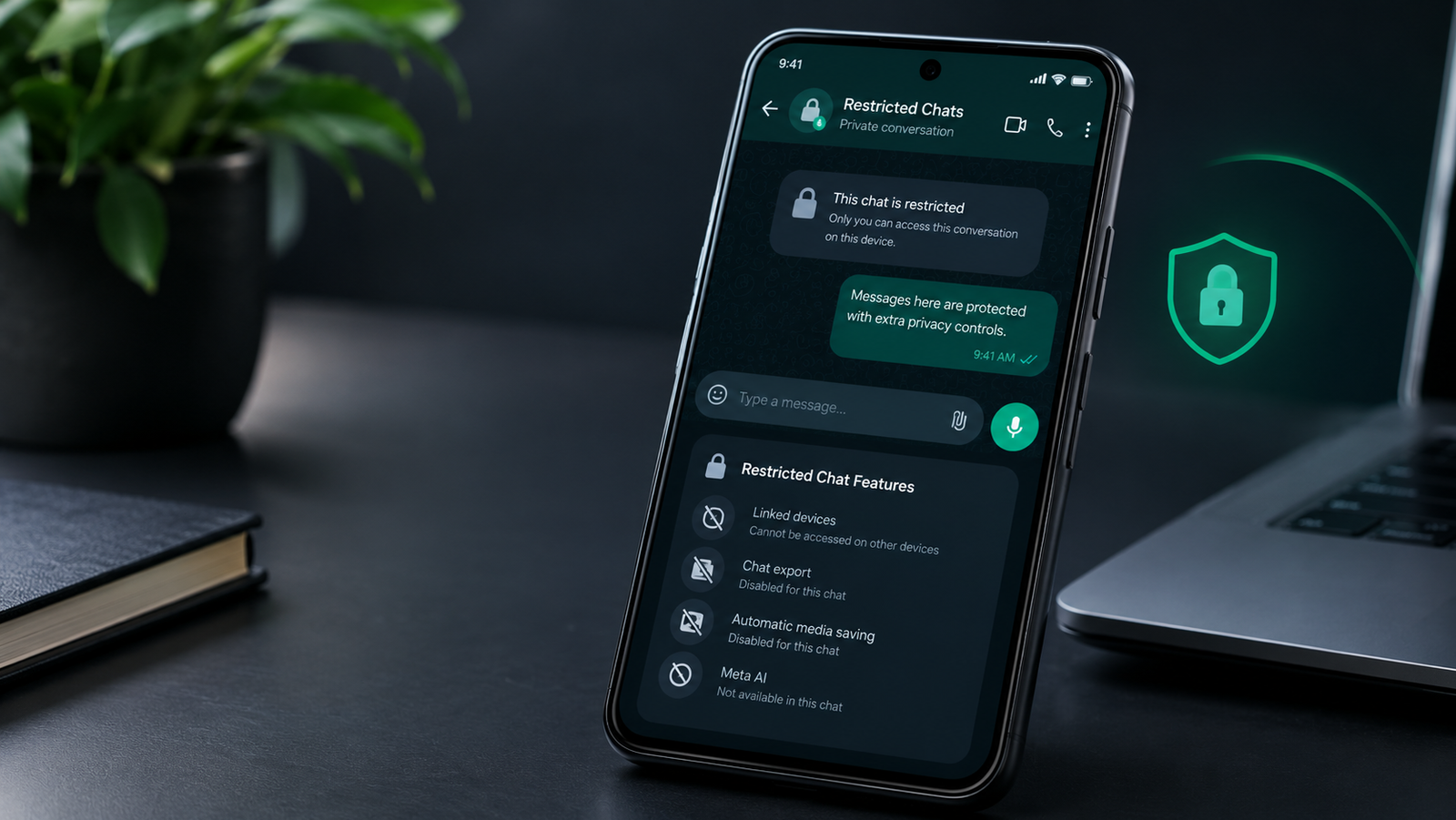
WhatsApp Restricted Chats Android Beta is now rolling out to some beta testers, bringing new privacy controls to selected conversations. The feature limits several actions, including chat exports, automatic media saving, Meta AI access and use of the conversation on linked devices.
The rollout is gradual, so installing the compatible beta version does not necessarily mean the feature will appear immediately. Restricted Chat is designed for conversations where users want more control over how messages and media can be accessed, exported or used across other WhatsApp features.
WhatsApp Restricted Chats Android Beta Rollout Begins
The WhatsApp Restricted Chats Android beta rollout follows earlier testing of the feature in Android beta versions. WhatsApp has now started making the option available to a limited number of beta testers. Users who receive the feature can find Restricted Chat from the chat information screen and turn it on for an individual conversation.
The feature is optional and is not enabled automatically for every conversation. WhatsApp is also gradually expanding the rollout, meaning some beta users may have the required app version but still not see the option.
What Does WhatsApp Restricted Chat Do?
Restricted Chat adds several restrictions to a selected conversation. When enabled, WhatsApp prevents media from that chat from being automatically saved to the device gallery. It also disables the ability to export the conversation.
The feature additionally prevents Meta AI features from being used inside the restricted conversation and stops the chat from being available on linked devices. These controls are applied to the conversation rather than being a single account-wide setting.
Restricted Chats Stay on the Primary Phone
The most notable change in the latest rollout is the restriction on linked devices. A restricted conversation cannot be accessed through WhatsApp Web, desktop apps, tablets or other linked devices. The chat remains available on the user’s primary phone.
WhatsApp says this restriction can also help prevent unofficial clients or AI agents from accessing the conversation through a linked device. This makes Restricted Chat different from simply hiding a conversation from the main chat list. The feature changes where that particular conversation can be accessed.
Meta AI Is Also Restricted
Another part of the new privacy layer is the restriction on Meta AI within the conversation. When Restricted Chat is enabled, Meta AI features cannot be used inside that specific conversation. This adds another barrier for users who want to keep a particular chat outside AI-assisted features. The restriction applies to the selected conversation rather than disabling Meta AI across WhatsApp.
Chat Export and Automatic Media Saving Are Disabled
Restricted Chat also limits two common ways of moving information outside a conversation. Users cannot export a restricted chat, while photos and videos shared within the conversation are prevented from being automatically saved to the device gallery.
These controls are intended to give users greater control over sensitive conversations without changing WhatsApp’s basic messaging system. However, Restricted Chat should not be treated as a complete protection against every possible way information can be copied or shared. The currently reported restrictions focus on export, automatic media saving, Meta AI access and linked devices.

How Restricted Chat Is Different From Advanced Chat Privacy
WhatsApp’s new Restricted Chat feature builds on the idea behind Advanced Chat Privacy, but its purpose is more specific. Advanced Chat Privacy introduced additional controls for individual conversations, while Restricted Chat adds the ability to keep a selected conversation away from linked devices.
WhatsApp is also presenting Restricted Chat as an optional privacy control rather than something required to keep messages secure. Messages and calls remain protected by end-to-end encryption whether or not Restricted Chat is enabled.
Restricted Chat Is Currently for Individual Conversations
The current beta reports indicate that Restricted Chat is available for individual conversations rather than being a general privacy switch for an entire WhatsApp account. That means users can decide which conversations need the additional restrictions. This could make the feature useful for chats containing personal information, sensitive discussions or other conversations that users do not want appearing on linked devices.
When Will Restricted Chat Reach Everyone?
WhatsApp has not announced a public release date for Restricted Chat. For now, the feature is being rolled out gradually to selected beta testers on Android. The compatible Android beta version is 2.26.39.11, but access is still dependent on WhatsApp enabling the feature for an account.
The final version could also change before WhatsApp makes Restricted Chat available to everyone. For users who do not see the option yet, updating to the latest WhatsApp version does not guarantee immediate access because the rollout is limited.
WhatsApp Continues Its Android Privacy and Interface Changes
The Restricted Chat rollout comes at a time when WhatsApp is testing several changes to its Android app. The company is also experimenting with a redesigned bottom navigation bar and other changes to how major sections of the app are organized. Recent beta developments include changes involving Channels and a potential new Contacts section. This suggests that WhatsApp is continuing to make broader changes to both the Android interface and its privacy controls.
For now, Restricted Chat is one of the more significant privacy-focused changes being tested, particularly because it prevents selected conversations from appearing on linked devices. The latest WhatsApp Restricted Chats Android beta update gives users more control over sensitive conversations by limiting linked-device access, disabling chat exports, preventing automatic media saving and restricting Meta AI features within the selected chat. The feature is currently reaching some Android beta testers through version 2.26.39.11, but there is still no confirmed date for a wider public rollout.