


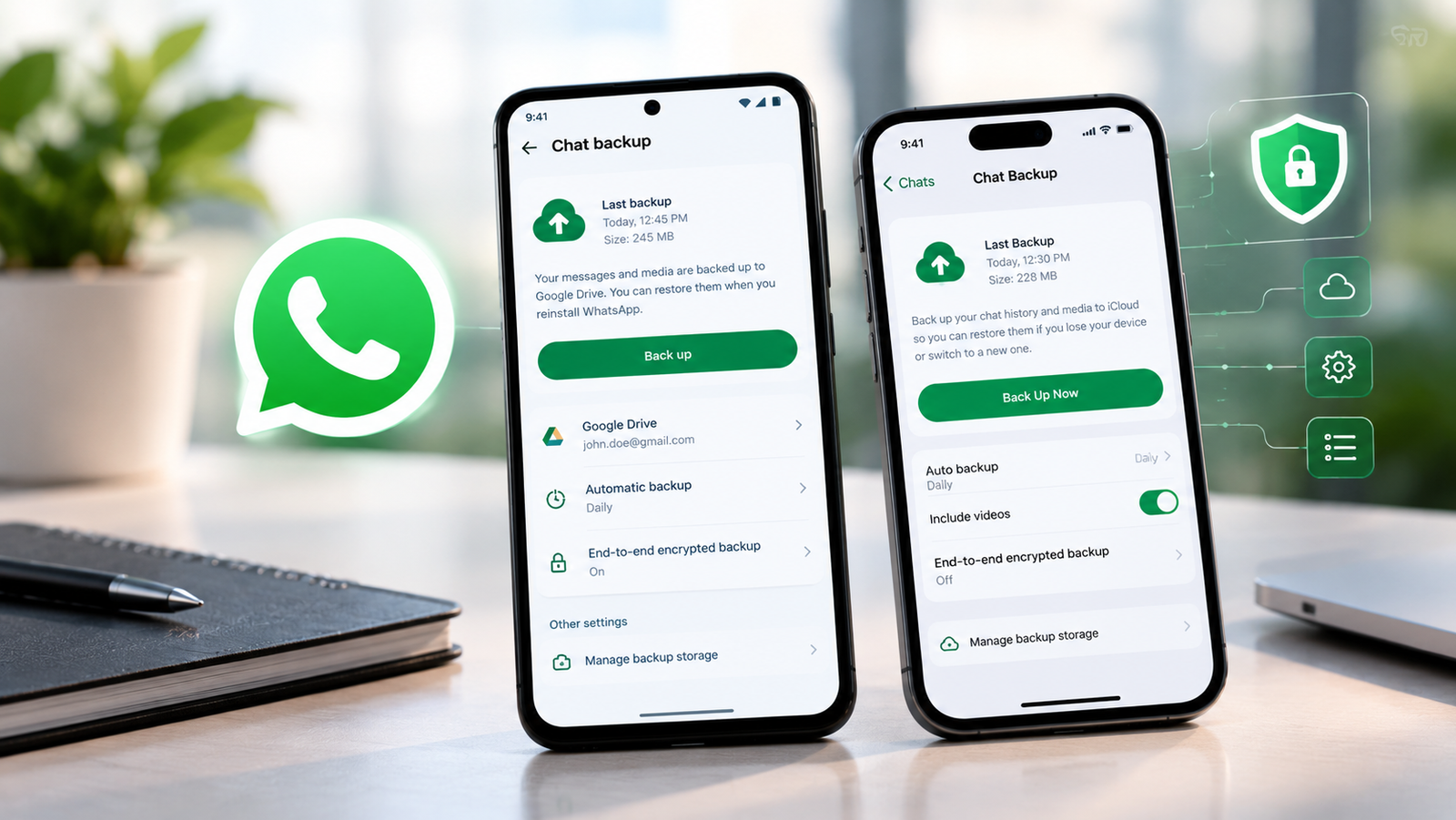
WhatsApp chat backup screen redesign is rolling out a redesigned chat backup screen on Android and iPhone, giving users a simpler way to check their backup status and manage important settings. The updated interface separates essential backup information from additional options, making it easier to see whether automatic backups are enabled and start a backup manually.
The WhatsApp chat backup screen redesign is part of the messaging platform’s ongoing interface improvements. Instead of displaying every backup option on one page, the new layout puts key information first and moves additional settings to a separate screen. According to a report published by WABetaInfo on October 28, 2026, the redesigned interface is reaching selected users on both platforms. The rollout is gradual, so not everyone will see the updated screen immediately.
What’s New in the WhatsApp Chat Backup Screen Redesign?
The biggest change is the way WhatsApp chat backup screen redesign organizes its backup information. The main backup screen now focuses on essential details, including the status of automatic backups, the next scheduled backup and an option to back up chat history manually. Additional controls are available through a separate settings screen. This reduces the number of options displayed together and gives users a more straightforward way to check their backup status.
The redesigned interface focuses on three main areas:
- Backup status: Check whether automatic backups are active and review the available backup information.
- Manual backup: Start a new backup without navigating through several different settings.
- Additional options: Access backup frequency, video preferences and encryption settings from a separate screen.
The exact information displayed may vary between Android and iOS.
WhatsApp Separates Backup Status From Settings
One of the main improvements in the WhatsApp chat backup screen redesign is the separation of backup information from configuration options. Previously, users could find the backup status and several related settings together on the same page. The new interface makes the main screen less crowded by moving additional controls elsewhere. This change could be useful for people who regularly check whether their conversations are backed up but rarely change their backup preferences.
For example, someone preparing to switch phones may want to confirm that a recent backup exists before transferring their account. A clearer backup overview can help them find the relevant information more quickly. Users who want to change their automatic backup frequency or video preferences can access the additional settings separately. The redesign changes how the options are organized rather than introducing an entirely new messaging feature.
What Backup Information Can Users See?
The redesigned WhatsApp chat backup screen redesign screen provides a clearer overview of the backup process. According to WABetaInfo, the updated interface can show whether automatic backups are enabled, when the next backup is scheduled and whether end-to-end encryption is active. Users can also start a manual backup from the main screen.
These details are important because having automatic backups enabled does not necessarily mean that a new backup has completed successfully. Users should review the information displayed in their own app and confirm that their recent conversations have been saved. The available information may differ depending on the device, operating system and app version.
WhatsApp Backup Settings on Android and iPhone
Although the redesigned interface is being rolled out on both platforms, some options differ because Android and iOS use different backup systems.
WhatsApp Backup Settings on Android
On Android, WhatsApp backups are commonly associated with a Google account and Google Drive. The updated interface organizes the main backup information separately from additional settings. Users can access options such as automatic backup frequency, video inclusion and end-to-end encrypted backups. Android users may also see information about their linked Google account and shortcuts for managing backup storage.
To check your current backup settings:
- Open WhatsApp on your Android phone.
- Tap the three-dot menu.
- Select Settings.
- Open Chats.
- Select Chat backup.
Review the information displayed on the screen. The redesigned layout may not be available on every device yet.
WhatsApp Backup Settings on iPhone
On iPhone, WhatsApp chat backups are associated with iCloud. Users can access their existing backup settings through the app’s Settings menu. To check your current backup:
- Open WhatsApp on your iPhone.
- Tap Settings.
- Select Chats.
- Open Chat Backup.
- Review the available backup information and options.
The redesigned interface separates the main backup overview from additional controls. WABetaInfo also reports that the updated iOS screen includes an option to turn off backups on iCloud. However, available settings depend on the version and rollout status of the app.
Does the New WhatsApp Backup Screen Improve Security?
The WhatsApp chat backup screen redesign interface makes backup information easier to find, but a visual redesign should not be confused with a change in security protection. WhatsApp supports end-to-end encrypted chat backups for users who enable the feature. When enabled, this provides additional protection for stored backup data. The updated screen makes the encryption status more visible, helping users check their existing settings.
However, users should not assume that every backup is automatically end-to-end encrypted simply because the new interface appears. If you store important conversations, review your backup settings and confirm whether end-to-end encryption is enabled. You should also make sure that you can access the account associated with your backup. These checks are particularly useful before switching devices or reinstalling WhatsApp.
Is WhatsApp Adding a Feature to Manage Old Backups?
WhatsApp chat backup screen redesign has also been working on improved backup management for Android. Earlier reporting from WABetaInfo described a feature intended to let users review previous backups and remove old or duplicate copies. The aim is to make it easier to manage storage associated with chat backups. However, this development should be distinguished from the redesigned backup screen that is currently rolling out.
The availability of individual backup-management options can vary, and features under development should not be treated as universally available. Users should check their own app before assuming they can view or delete previous backups through the new interface.
When Will the WhatsApp Chat Backup Screen Redesign Be Available?
The redesigned WhatsApp chat backup screen redesign chat backup screen is gradually rolling out to selected Android and iOS users, according to WABetaInfo’s October 28 report. Some users may receive the new interface through a beta version, while others may see it in a compatible stable release. There is currently no confirmed date for when the redesigned screen will become available to everyone.
If your backup settings still look the same, it does not necessarily mean there is a problem with your account. You can check the Google Play Store or Apple’s App Store for an available WhatsApp update. However, installing the latest version does not guarantee immediate access because feature availability can also depend on the rollout. Avoid reinstalling WhatsApp simply to try to obtain the redesigned screen, particularly if you have not confirmed that your existing chat backup is available.
Why This WhatsApp Update Matters
WhatsApp chat backup screen redesign help users preserve conversations and associated information when changing phones or reinstalling an app. However, backup settings can become confusing when status information, scheduling controls and security options appear together. By separating the main backup overview from additional settings, WhatsApp is making this part of the app easier to navigate.
The practical benefit will depend on how users interact with the updated layout, but a clearer overview could make routine backup checks more convenient. The change is especially relevant to people who rely on WhatsApp for work conversations, family messages and other important discussions. It is primarily an interface improvement, rather than a new messaging feature, but it addresses a part of WhatsApp that users depend on to maintain access to their chat history.
Final Thoughts
The WhatsApp chat backup screen redesign introduces a cleaner way to check backup status and access related settings on Android and iPhone. The main screen focuses on essential backup information, while additional options are organized separately. This could make checking backups and managing preferences more convenient. The redesigned interface is rolling out gradually, so some users may need to wait before it appears on their devices.
For now WhatsApp chat backup screen redesign users, should review their existing backup settings and confirm that their preferred backup and encryption options are enabled. As WhatsApp continues refining its interface, the rollout will determine how widely users benefit from the updated backup experience.